Tags: billing
Amicus Attorney by CARET Administrators may designate Firm Members with Billing rights from their Administration Profile.
To set a Firm Members Billing access an Amicus Administrator must go to Firm Settings > User Management.
Within the User Management screen the permissions can be set via the following methods:
Double click the users name to open their Profile. Select the Admin... button in the lower left.
Right-click the User and select Open Admin Profile.
Under the Billing Security Profile, you have the option to select No Access, Billing User or Billing Supervisor.
You can also select Billing User/Billing Supervisor from the pop-up menu when you right click on a Firm Members name.
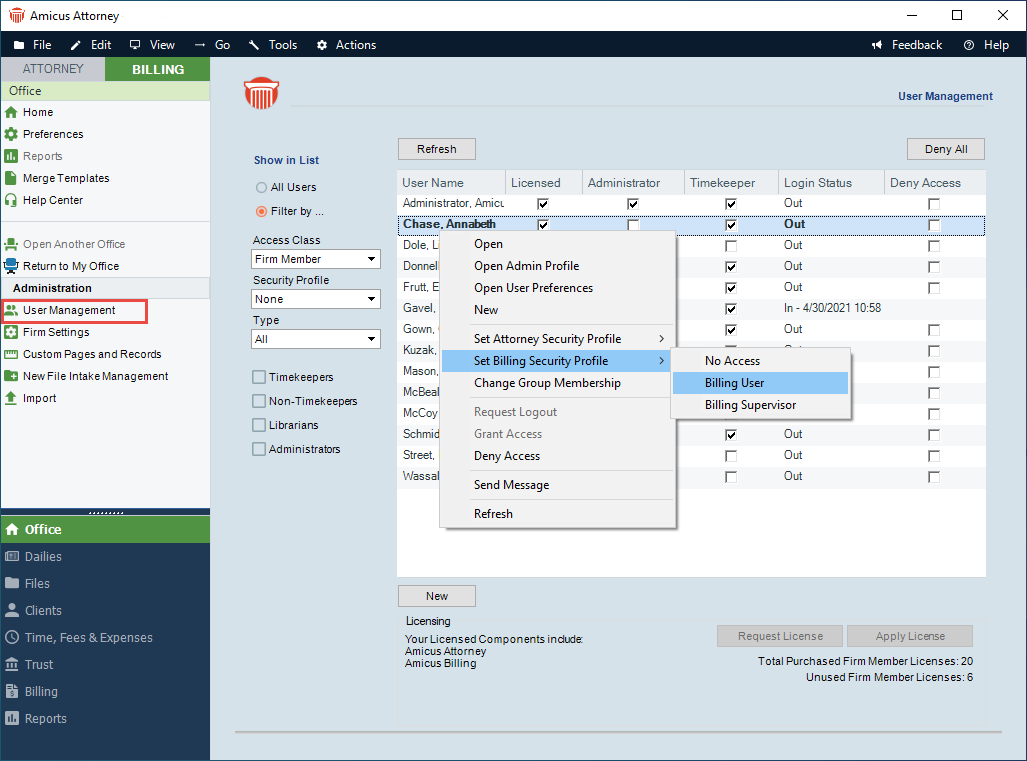
-
Billing Supervisor – Users assigned to this role have the highest level of access. This role is un-editable by the Firm. Billing Supervisors manage all billable files and primary clients for the firm (including restricted billable files and clients). They can create / edit / delete all billing related transactions. By default, only Billing Supervisors can access the Trust and Billing modules.
-
Billing User Access – This is the most common security profile. Firm Members with this Billing Security Profile can create billing related transactions for files they can access. However; they cannot access all modules such as Trust and Billing. Firms can edit this profile to customize it to their needs.
- No Billing Access – A firm member without access to any of the billing functions. This is an Amicus Attorney user with a Billing Profile set to None. The Firm cannot edit this profile. When assigned to this Billing Security Profile the user will not see the Billing heading in Amicus.
Comments
0 comments
Please sign in to leave a comment.