Tags: billing
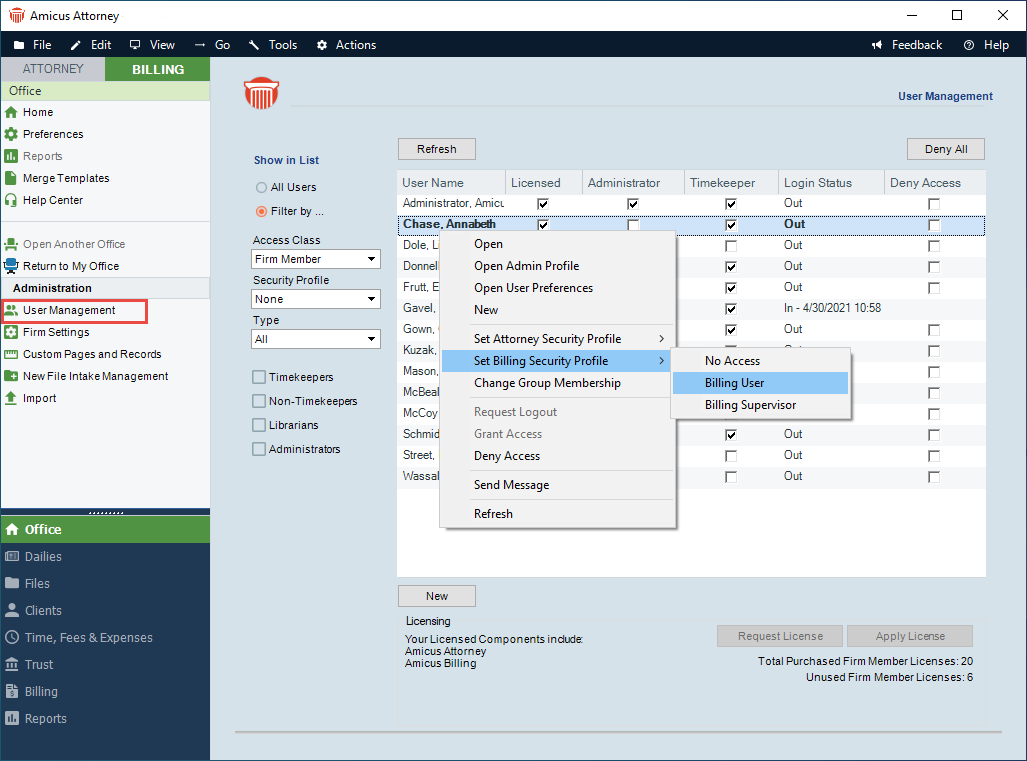
Amicus Attorney by CARET Administrators may designate each Firm Member with special Billing rights from their Administration Profile. This can be done by going to Firm Settings -> User Management. Open the user profile and click on the Admin button. Under the Billing Security Profile, you have the option to select No Access, Billing User or Billing Supervisor.
You can also select Billing User/Billing Supervisor from the pop-up menu when you right click on a Firm Members name.
- Billing Supervisor – Users assigned to this role have the highest level of access. This role is un-editable by the firm. Billing Supervisors manage all billable files and primary clients for the firm (including restricted billable files and clients). They can create / edit / delete all billing related transactions. By default, only Billing Supervisors can access the Trust and Billing modules.
- Billing User Access – This is the most common security profile. Firm Members with this security profile can create billing related transactions for files they can access. However; they cannot access all modules/grids such as Dailies, Trust and Billing. Firms can edit this profile to customize it to their needs. To access Other Firm Member’s Files and Contacts ensure that this option is enabled on the Attorney side.
- No Billing Access – A firm member without access to any of the billing functions. This is an Amicus Attorney user with a Billing Profile set to None. A Firm cannot edit this profile.
Comments
0 comments
Please sign in to leave a comment.